Texas Emergency Services District websites

Emergency Services District
website design & management.

Give residents a clear path to district information. Work with a Texas web designer and website manager who already builds for Emergency Services Districts.

Work directly with John Ortmann · Website service since 1998

Clear public information

District business,
easy to find.

  • Agendas & approved minutes
  • Organized public documents
  • Commissioner & district contacts
  • An agreed publishing plan
Explore ESD website features

Built around the work of your district

A web designer and manager for Texas Emergency Services Districts.

Your ESD website is a working source of public information. Residents need to find the next meeting, open an agenda, check approved minutes and reach the right district contact. Commissioners and staff need a dependable process for keeping those pages current.

Victoria Web Design builds and manages Emergency Services District websites with those everyday tasks in mind. We organize the district’s real documents, preserve useful archives and create a clear experience on phones and desktop computers. You work with a Texas company and a real person throughout the project.

Our ESD website experience

Two Texas districts.
Real websites you can explore.

These are Emergency Services District websites we design and manage.

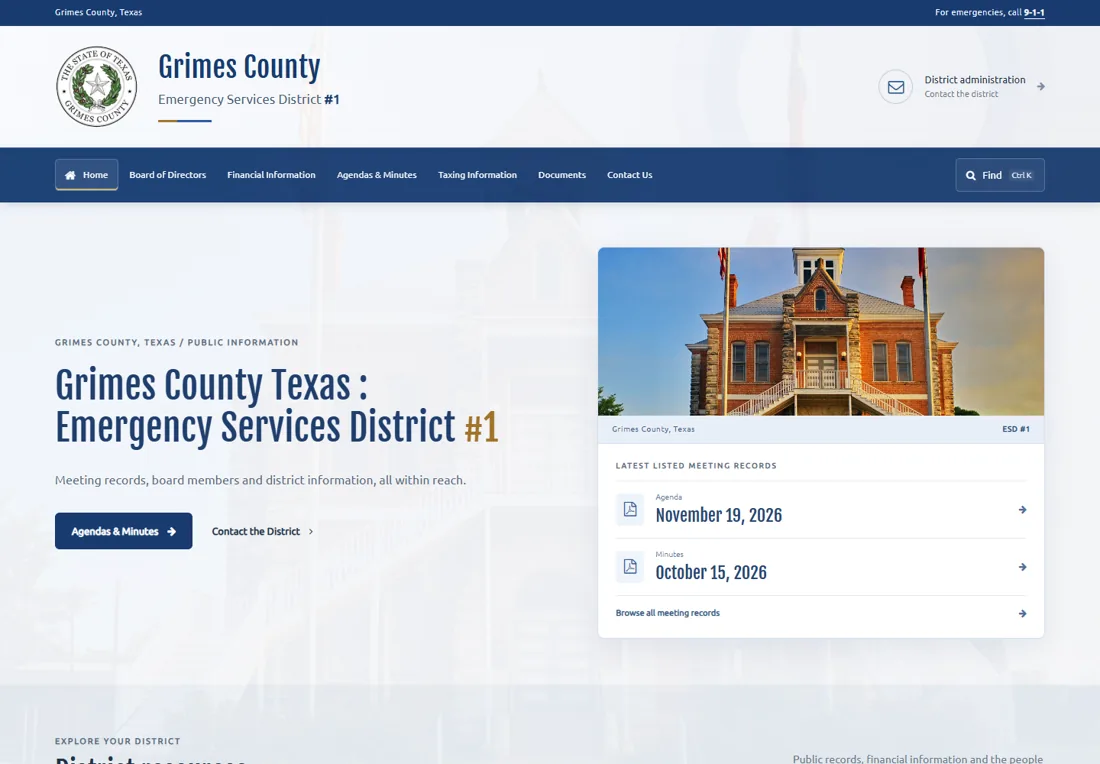
Grimes County Emergency Services District #1 website by Victoria Web DesignExplore website

Grimes County, Texas

Grimes County ESD #1

District information, tax documents and a meeting archive give the public an organized place to start. Agendas and minutes can be explored by meeting or in a document list, with year and search tools for finding older records.

  • Meeting archive
  • Agendas & minutes
  • District documents
Explore the meeting records (opens in a new tab)
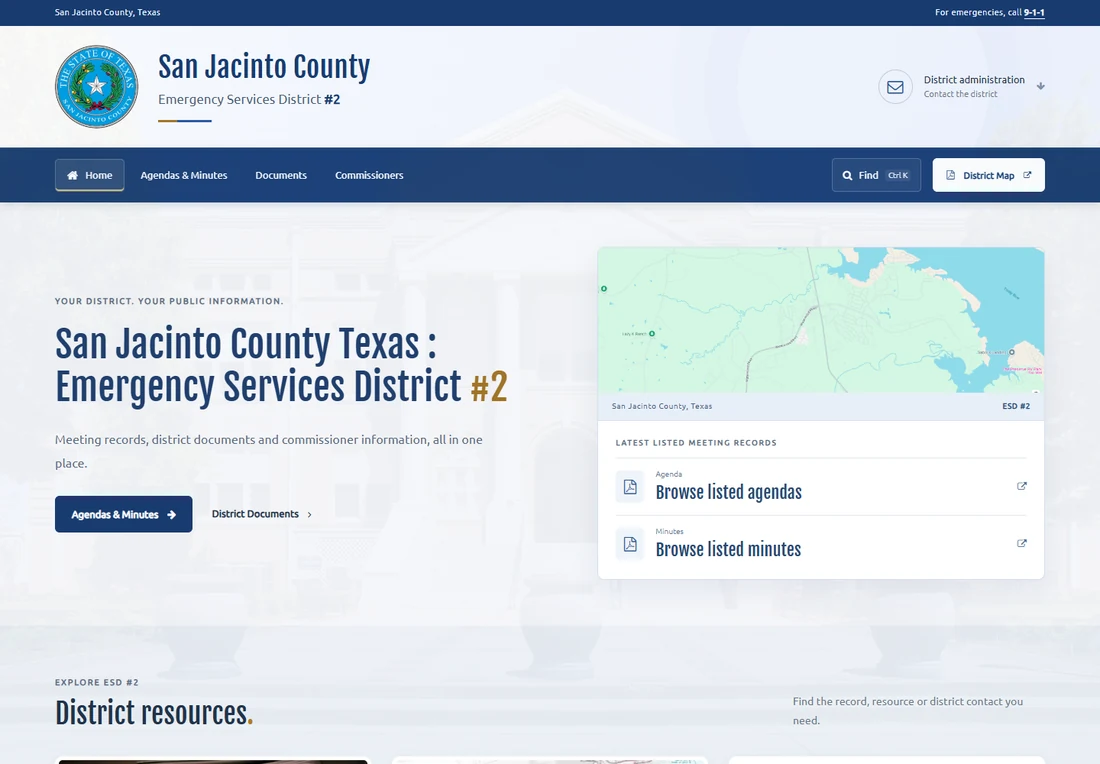

San Jacinto County Emergency Services District #2 website by Victoria Web DesignExplore website

San Jacinto County, Texas

San Jacinto County ESD #2

Meeting records, district documents and commissioner information are brought together in a straightforward public website. Latest-listed document links provide a route into the archive, while the meeting and document views help residents choose how to browse.

  • Latest listed records
  • Commissioner information
  • Document search
Explore the meeting records (opens in a new tab)

Useful ESD website features

Make the important information
the easiest information to find.

01

Agendas & meeting minutes

Group records by meeting date, keep agendas visually distinct from minutes, and offer both meeting and document-list views. Filters, year groups and clear PDF links make a growing archive easier to use.

02

District documents

Give budgets, financial reports, tax information, policies and other approved documents clear sections and meaningful filenames. Preserve the district’s records and make important downloads easier to locate.

03

Commissioners & contacts

Present board information and district contact routes clearly. Use the details your district approves, with readable phone links and contact options that work on a mobile device.

04

Current notices & meetings

Provide a prominent home for approved announcements and upcoming district business. Latest-listed document links can follow the archive, reducing the need to update the same information in two places.

05

Accessible, mobile-friendly pages

Use readable text, strong contrast, descriptive links and keyboard-friendly navigation. Residents should be able to find district information whether they use a phone, a larger screen or a keyboard.

06

Careful website transitions

Review the existing pages and PDFs before rebuilding. Keep useful document addresses working where practical, redirect changed pages and check the new website before the district approves publication.

ESD website management after launch

A clear plan for keeping
district information current.

Good organization at launch is only the beginning. Agendas, approved minutes, contact changes and new district documents need an agreed route from your staff to the website.

We discuss the frequency of document updates, who supplies approved material and the publishing turnaround your district needs. Recurring meeting-document publishing can be included in the agreed scope and service agreement.

Discuss your publishing needs
  1. 1. Review your current websiteIdentify the pages, archives and public tasks that matter.
  2. 2. Agree on the website and posting planDefine the build, document workflow, responsibilities and fees.
  3. 3. Review the draft with your districtCheck the design, navigation, content and existing document links.
  4. 4. Keep the relationship goingSend approved changes through the agreed publishing process.
John Ortmann, founder of Victoria Web Design

Texas roots. Personal service.

Your district website deserves
someone on the other end.

I started Victoria Web Design in 1998. My commitment is to build the website, stay involved and be here when you need help keeping it current. For an ESD, that relationship begins with understanding your district’s documents, public information and posting needs.

John Ortmann Founder · Victoria Web Design

Read my story and commitment

Before your district’s next website

ESD website design questions.

01Do you already design and manage ESD websites?

Yes. Our Emergency Services District work includes Grimes County ESD #1 and San Jacinto County ESD #2. You can explore both websites and their public meeting archives from the examples on this page.

02Can you organize our existing agendas, minutes and PDFs?

Yes. We review your existing records, keep the district’s documents and organize the archive around clear meeting dates and document types. We also review old page and PDF links so useful addresses can be retained or redirected where practical.

03Can the homepage show our latest listed meeting documents?

Yes. Latest-listed document links can follow the meeting archive, giving residents a direct route to the newest records listed there. The archive remains the source for those links, and the behavior is checked as part of the website build.

04Can you handle recurring ESD website updates?

Yes. We can agree a publishing arrangement for approved agendas, minutes, notices and other district information. The frequency, responsibilities, turnaround and fees are discussed and recorded in the scope and service agreement.

05Does our staff have to learn website coding?

Your district can send approved documents and requested changes through the agreed process. We can handle the website work. If your staff prefers to maintain particular listings, we can also discuss a straightforward editing arrangement.

06Will our ESD website work on phones and with a keyboard?

We build responsive pages with readable text, descriptive links and keyboard-friendly navigation, and check the layouts and controls before publication. Existing PDFs are reviewed separately so any document accessibility work can be included in the project scope.

07How much does an Emergency Services District website cost?

The construction fee depends on the pages, existing archive, document organization and features your district needs. Ongoing management and recurring publishing are defined in the quote and service agreement. Tell John about your district for a tailored quote.

A practical next step for your district

Let’s talk about your ESD website.

Tell John your district’s name, your current website if you have one, and what needs to work better. We will talk through a new website, a rebuild or ongoing management.

Call JohnText JohnFree website quote

Find your next step.

Ctrl / ⌘ K to open · Escape to close